BOYA Notra Neo: Recording, AI Notes & Plan Costs — NewDrops.Tech
Explainer / NEWDROPS.TECH
BOYA Notra Neo: Recording, AI Notes & Plan Costs
BOYA Notra Neo links dedicated recording with AI transcripts and summaries. See how its recording modes work, what plans include, and how to budget your minutes.
By Wear GritPublished 10 min read
Source-based reporting · No NewDrops.Tech hands-on testing
Source-based explainer using BOYA’s Neo documentation, its Quick Start guide, the US Boya OS App Store listing and Apple’s Voice Memos guide. Sources checked 30 October 2026. NewDrops.Tech has not tested the recorder or measured transcription accuracy.
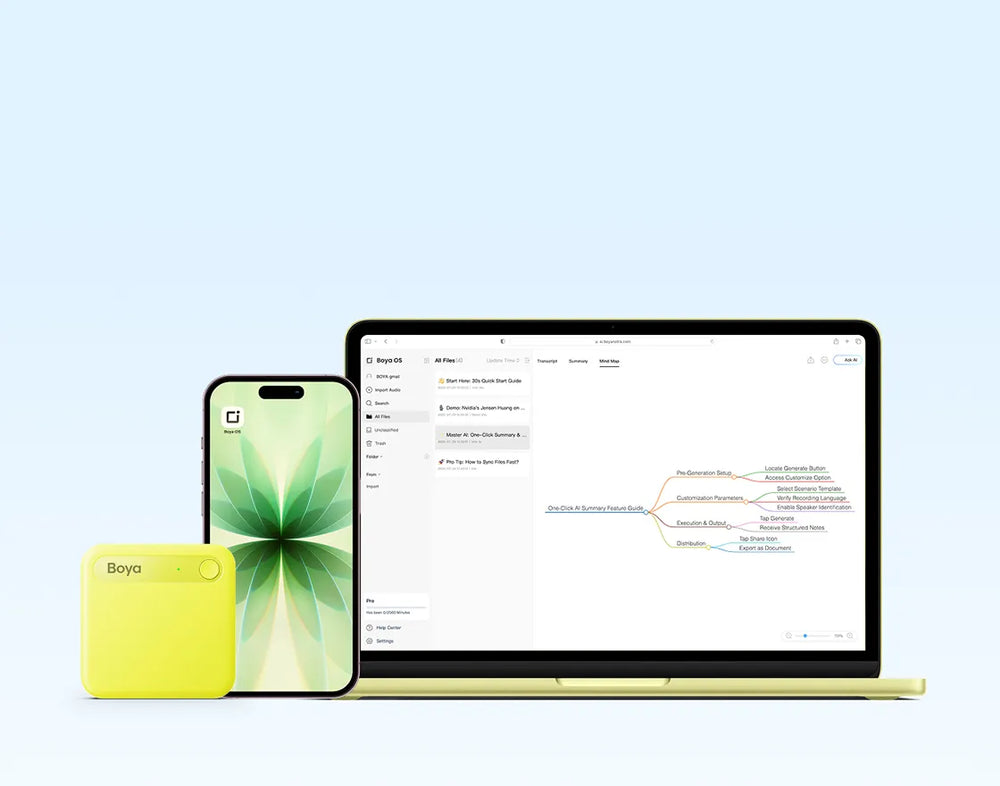
The BOYA Notra Neo combines a dedicated recorder with the Boya OS app and web service. The hardware captures conversations; the service turns recordings into transcripts, summaries, action items and mind maps. Buying the recorder gives access to a workflow with a monthly transcription allowance, rather than unlimited AI processing simply because space remains on the device. BOYA’s Neo documentation.
Its strongest potential use is a recurring task: recording a permitted lesson, meeting or interview, then producing a checked note that can be edited and shared. Whether that is useful depends on the recording route, the amount of material sent for transcription and the work needed to correct the result. These decisions matter more than the number of templates in an advertisement.
BOYA documents three modes: Ambient Recording for people in the same room, Phone Call Recording with the Neo attached to the phone, and Bluetooth Recording for compatible earbud-based calls or meetings. The Neo automatically recognizes the recording scenario; it does not use the original Notra’s manual mode-switching arrangement. These are distinct models. Neo recording-mode FAQ.
For a room conversation, choose a position that makes the relevant speakers audible before evaluating the transcript. A recording of the room and a recording through paired earbuds use different audio paths; testing one does not establish the result of the other.
Phone Call Recording has a different physical setup: attach the Neo to the back of the phone, then start recording. Bluetooth Recording adds a wired connection to the phone or computer plus earbud pairing in Boya OS under Me → My Device → Bluetooth Headset. A Bluetooth label should not be read as a promise that every wireless call setup works identically. Neo Quick Start connection instructions.
For Bluetooth use, BOYA recommends Apple AirPods and Samsung Galaxy Buds and acknowledges variation between phone, computer and earbud combinations. If this is the main reason to buy, the exact combination is a material compatibility question. Successful room recording would not establish that an earbud call is being captured correctly.
What works independently, and what needs Boya OS
The Quick Start guide requires downloading Boya OS and binding the device before first use. It documents a long press to start recording, with one vibration, and another long press to stop, with two vibrations. A short press during recording marks an important moment. After setup, BOYA says the Neo can record and save files without an active app connection. Neo Quick Start guide.
The distinction is useful for a lecture: capture can happen on the recorder, while reviewing and processing happen later through the service. BOYA lists 8GB of local storage and up to 20 hours of continuous recording. That battery claim describes capture endurance, not the number of minutes the account can transcribe free each month. Manufacturer storage and endurance specifications.
After recording, connect in Boya OS to transfer the files. The guide describes Bluetooth as the default and Wi-Fi for Fast Transfer, returning to Bluetooth afterward. A USB-C connection used in an earbud workflow should not be assumed to establish direct USB file export from the Neo. Its documented file-transfer paths are Bluetooth and Wi-Fi.
BOYA’s official First Use Guide below illustrates setup and operation. It is manufacturer instruction, rather than independent evidence of audio or transcription quality.
A recording preserves the captured sound. A transcript represents words as text. A summary selects and organizes information. Those outputs serve different purposes, and success in one does not establish the quality of the next. A tidy action list can still misrepresent a correction made late in the conversation.
Here is an illustrative meeting example, not a Neo test. Early in a discussion, someone proposes delivery on Tuesday. Later, the group agrees to Thursday, with Maya responsible for confirmation. A useful final note needs the Thursday decision and the responsible person. Keeping Tuesday because it was mentioned first would change the meaning, even if that sentence was transcribed correctly.
The review order follows the problem. First locate the decision in the audio, then check the transcript, then check whether the summary retained the correction. Mark an unresolved speaker or date instead of supplying a confident guess. For a quotation, use the recording as the reference; a summary is a different kind of document.
A practical handoff can retain the original audio, a corrected working transcript and a clearly named final note. This creates a route back to the evidence without asking every recipient to read the whole conversation. It also makes the human review visible rather than presenting an automated draft as something every participant has approved.
Budget transcription minutes separately from recording time
The standard Starter allowance is 320 transcription minutes per month. BOYA also documents 600 minutes per month for 12 consecutive months for eligible new users who bind a new device under an offer available through 31 December 2026. The promotional figure should not replace 320 as the normal allowance or be described as a permanent benefit. Starter terms and promotion.
Consider a month with five one-hour recordings. If each complete recording is submitted once and charged at its full duration, that is 5 × 60 = 300 minutes, leaving 20 under standard Starter. A sixth hour brings the total to 360, which exceeds 320 by 40 minutes. This is a planning calculation, not a measurement of BOYA’s billing system.
Under the eligible 600-minute promotion, ten one-hour recordings would use the full allowance on the same assumptions; an eleventh would exceed it by 60 minutes. For a heavier routine of five hours per week over a deliberately assumed four-week period, the total becomes 1,200 minutes. That exceeds either Starter figure but fits within the listed 1,280-minute Pro allowance, leaving 80 minutes.
These examples make the next decision clearer. An occasional overrun and a regular 1,200-minute month are different purchasing problems. BOYA offers extra transcription minutes as well as higher plans. The sources reviewed do not settle rounding, repeat-processing charges or unused-minute expiry for every account, so keep some margin rather than planning to the final minute.
What the paid routes currently cost
For a specific price reference, the US Boya OS App Store listing, checked on 30 October 2026, lists the following in-app purchases. These are US-dollar listing prices, not a promise about another country’s checkout, taxes or account-specific promotions. US app listing.
Listed purchase
US price
120 transcription minutes
$2.90
600 transcription minutes
$9.90
Pro, billed monthly
$17.99
Pro, billed annually
$99.99
Ultimate, billed annually
$239.99
BOYA’s plan comparison lists Pro at 1,280 monthly minutes and Ultimate with unlimited transcription. It also places Ask AI in the paid tiers. The Starter column has ten templates, so the headline advertising more than sixty templates should not be read as the contents of every free account. Current plan comparison.
Annual Pro’s listed charge is $99.99 for the year; it is not a $99.99 monthly price or permission to pay that annual amount in monthly instalments. A minute pack is a separate purchase. For a small overflow, inspect that option before committing to a recurring plan; for a consistent workload, compare the required allowance and features over the whole period.
Export according to the job the note must do
BOYA lists MP3 and WAV audio exports; DOCX, PDF, TXT, Markdown and SRT text exports; JPEG and Markdown for mind maps; and a sharing-link option. It also describes reviewing and editing through Boya OS App and Web. Neo export-format list.
Choose DOCX when a colleague needs to edit a document, Markdown or TXT for a text-based notes workflow, and PDF for a fixed reading copy. Keep an audio export when the task requires checking the source. SRT is relevant to a subtitle workflow, but its presence on the list does not establish that names, timing or speaker divisions need no correction.
An interview may need the audio and a corrected transcript rather than a compressed summary. A project meeting may need a short decision record with actions and unresolved questions. Exporting every available format creates more files without necessarily improving the handoff. Select the version that preserves the information the recipient needs, then identify it clearly as reviewed or still awaiting correction.
App compatibility and cloud processing remain part of the decision
BOYA’s download information lists Android 7.0 or later, while the US iPhone app listing requires iOS 15.6 or later. Confirm the current listing for the phone involved, especially if the recorder will be shared between different devices. A supported operating system does not establish compatibility with every earbud combination. BOYA downloads; iPhone requirements.
Independent recording should not be confused with an entirely offline AI workflow. BOYA’s Neo FAQ says cloud sync, AI transcription and summaries involve processing according to service requirements. It says data will not be used for AI training without authorization. That is the manufacturer’s statement, not a NewDrops privacy audit or a complete explanation of every provider, processing region and retention condition. Neo data-processing FAQ.
The app’s linked privacy policy also describes account information and service-related data handling. Anyone handling material with an organizational restriction needs approval for that service use, not simply permission to operate a recorder. Keep participant permission and the intended audience for a shared note clear before starting. Boya OS linked privacy policy.
Compare the extra device with an existing phone workflow
For an iPhone owner, Voice Memos is a concrete alternative worth checking before adding hardware. Apple documents transcription on iPhone 12 or later in supported languages and regions, plus transcript copying and search. Apple Intelligence can add summarization on compatible devices under its separate requirements. This is more specific than assuming every phone produces only raw audio. Apple’s Voice Memos transcription guide.
That alternative addresses ambient voice notes and recorded speech; it is not a claim that Voice Memos duplicates the Neo’s phone-call or Bluetooth recording routes. The comparison is about the particular job. If an existing phone already captures and transcribes occasional personal notes adequately, the Neo needs to solve an additional difficulty to justify another device and service.
Our assessment is to investigate the Neo when dedicated capture and its documented recording routes fit a recurring need, with enough transcription capacity for the month. Keep the phone workflow when it already serves the task. Treat a usable final note as the goal: understandable source audio, a checked decision record and an export the recipient can work with. The recorder is useful only as part of that complete process.