NVIDIA RTX Spark: Local AI Laptops Explained — NewDrops.Tech
Explainer / NEWDROPS.TECH
NVIDIA RTX Spark Brings Grace, Blackwell and Unified Memory to Windows Laptops
RTX Spark brings Grace, Blackwell and shared memory to Windows laptops. Explore the verified specifications, software release stages and practical buying checks.
By Latest TechnologyPublished 11 min read
Source-based reporting · No NewDrops.Tech hands-on testing
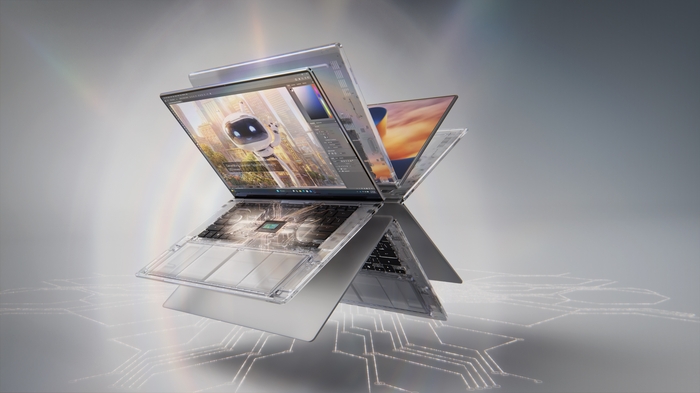
NVIDIA RTX Spark laptops began their commercial rollout on October 16, 2026, bringing a Grace Arm CPU, Blackwell RTX graphics and large shared memory configurations to portable Windows computers. The important development is the combination: local AI development, creative applications and gaming are being brought together around NVIDIA's Windows on Arm platform. That gives developers and creators a new configuration to evaluate when their projects need both GPU acceleration and substantial memory.
Related discoveries
Published products with matching topics or technologies.
The launch is real, but its significance deserves more careful explanation than a promise that every laptop can replace a cloud server. Memory capacity, software compatibility, model format and the performance of a particular laptop all matter. This article explains the verified hardware, separates available software from upcoming releases, and suggests practical questions to ask before choosing a system. It is based on source research, with manufacturer performance claims identified as such; it does not report hands-on testing. Sources were checked on October 18, 2026.
What launched, and which manufacturers are involved?
NVIDIA's October 16 launch announcement names ASUS, Dell, HP, Lenovo, Microsoft and MSI. Its lineup includes ProArt P14 and P16, XPS 16, OmniBook Ultra and OmniBook X 14, Yoga Pro 9n, Surface Laptop Ultra, and Prestige N16 systems. That supports a substantial partner rollout. It does not establish that every configuration is in stock in every country.
Treat the platform launch and your own delivery date as separate questions. Before ordering, check the manufacturer or authorized retailer for the exact memory, storage, regional keyboard, warranty and dispatch estimate. A familiar model family can contain different processors and configurations, so the product name alone is insufficient. Save the configuration details with your quotation rather than relying on a general announcement when comparing machines.
The architecture: Grace and Blackwell in one platform
According to NVIDIA's system overview, RTX Spark is an Arm-based system-on-chip platform for Windows laptops with integrated Blackwell graphics. NVIDIA's gaming launch briefing describes the Grace CPU and GPU as connected through NVLink-C2C. That is a more precise description than assuming every component is fabricated on one physical die merely because the product is called a superchip.
The practical question is what this integration lets an application do. A creator may want graphics acceleration while keeping a large project open; a developer may want to experiment with a local model without maintaining a separate inference workstation. Those are plausible reasons to investigate the platform. They should lead to demonstrations with the applications you actually use, rather than a purchasing decision based only on the architectural name.
Two N1X laptop variants, with important differences
The official RTX Spark specification sheet lists a laptop configuration with a 20-core Grace CPU and 6,144-core Blackwell RTX GPU, alongside an 18-core CPU and 5,120-core GPU configuration. Both laptop entries specify a 45–80 W TDP range and Windows 11 support. The higher configuration supports up to 128 GB of LPDDR5X unified memory. These are platform specifications, rather than a guarantee that every partner laptop offers every option.
The shared N1X name makes careful configuration checking particularly useful. Ask for the CPU core count, GPU configuration and installed memory together. Do not compare two machines as if they were identical simply because both advertise RTX Spark. Also avoid reading chip TDP as the laptop's complete electrical consumption or as a battery-life measurement. For a purchase comparison, seek results that specify the actual machine and power mode.
Why shared memory matters
NVIDIA's unified memory documentation explains the platform's shared physical memory architecture. The appeal for large projects is straightforward: applications are working within an architecture where CPU and integrated GPU use a common memory resource, rather than treating a separate graphics card's onboard memory as the only relevant capacity figure. However, application allocation rules and other memory users still matter.
Microsoft makes a crucial qualification on its Surface Laptop Ultra page: the CPU and GPU share system memory, and GPU-addressable memory is less than the total installed amount. Therefore, a 128 GB laptop should not be described as a graphics card with 128 GB of freely available VRAM. Leave headroom for Windows, development tools, browser sessions and other applications when deciding whether a workload fits.
For an evaluation, start with the complete workload rather than the model download size alone. Ask the vendor to show the intended model loaded in the intended application, with the context length and other programs you expect to use. Record both whether it runs and whether its response time is acceptable. A demonstration that loads successfully answers a different question from one that remains responsive throughout a working session.
Reading the large-model performance claims
NVIDIA's RTX Spark product page advertises up to one petaflop of FP4 AI performance and models up to 120 billion parameters with a one-million-token context. These are manufacturer claims about supported capabilities. They should not be converted into a promise that every 120-billion-parameter model, every precision and every context setting will deliver the same experience on every configuration.
For a useful comparison, request the model name, quantization, runtime, context setting and measured response rate. If the task is interactive coding, look at the wait before the first useful answer as well as output speed. If it is batch processing, measure the completed workload. If it is fine-tuning, request a demonstration of that exact workflow. The ability to perform inference does not, on its own, establish the practicality of training or fine-tuning the same model.
Windows on Arm compatibility deserves its own check
RTX Spark's CPU architecture makes software readiness part of the hardware decision. NVIDIA publishes a porting and emulation guide covering the transition to Arm. The existence of compatibility mechanisms is useful, but a general statement that an application runs on Windows does not answer every question about its dependencies, extensions or acceleration path on a particular system.
Make a short compatibility list before buying. Include your editor, compiler, Python environment, required libraries, creative applications, plug-ins and peripheral drivers. Identify which versions the supplier supports and which functions need native Arm builds. For team deployment, test the actual project environment before ordering a fleet. Finding one incompatible dependency early is more useful than discovering it after the machines have become part of a production workflow.
Creator applications: check release status and project fit
The Adobe and NVIDIA collaboration announcement describes work on creative acceleration. NVIDIA's launch release specifies native Photoshop and Premiere support through beta releases at launch, with Substance support coming later. Those release stages matter: a beta availability statement should not become an assertion that all production versions and every creative workflow are already validated.
For a video editor, a sensible trial would use representative camera files, effects and export settings. For a 3D artist, it would use a scene with comparable assets, materials and renderer settings. Ask whether the demonstration uses a beta application, and whether the features you need are supported in the version your studio permits. A large memory specification is useful context, while a repeatable project test is stronger purchasing evidence.
Gaming is part of NVIDIA's stated positioning
RTX Spark is explicitly marketed for creation, AI and gaming. NVIDIA's October 13 gaming briefing lists ray tracing, DLSS and Reflex support, along with many supported games. Gaming is therefore part of the intended platform experience. Support for the platform does not establish identical performance or compatibility across the entire Windows game catalog.
If gaming matters to your decision, check your own library rather than an aggregate game count. Confirm the title, current version, anti-cheat requirements and supported features. Then compare independent measurements at your preferred resolution and settings on the exact laptop configuration. A development machine that also plays your favorite games may be useful, but that combination should be evaluated against your priorities rather than assumed to provide the best value for every player.
DLSS 5: what became twice as fast?
NVIDIA's October DLSS update says the 3D-Guided Neural Rendering model became twice as fast, with 20% lower 4K VRAM usage compared with September's model. It separately claims frame-rate improvement of up to 1.4 times in NBA 2K27. These are distinct measurements. The two-times figure is not a blanket claim that games run twice as fast or that every game's total memory use falls by 20%.
Timing also needs precision. The same announcement says DLSS 5 neural rendering launched the previous month, with RTX Spark support arriving October 16. It schedules Hogwarts Legacy support for November 5 and an RTX Remix update for October 23. As of the source-check date, those later updates remain upcoming. When evaluating a game, check the feature available today rather than treating an announced future integration as installed software.
Nemotron 3.5 Bolt: one available model, another upcoming
NVIDIA's October 15 Nemotron announcement distinguishes Nemotron 3.5 Bolt 74B-A9B 24GB, available at that time, from Bolt E4B 4GB, scheduled for October 23. Describing both as already released would be premature. The larger Bolt model is intended for local agent workloads across supported NVIDIA systems; its availability is not exclusive to RTX Spark laptops.
The Bolt technical report describes compression and two-bit quantization aimed at fitting the model into a 24 GB memory footprint. That offers a concrete example of why model format matters alongside parameter count. It does not mean a laptop with exactly 24 GB of total system memory automatically has enough space for the model, operating system and every other part of an agent workflow.
When trying a local agent, begin with a bounded task and review the result. Decide which folders and tools it may access, and test how it handles failures before giving it important work. Running a model locally is one part of that assessment. The surrounding applications, network tools and permissions deserve attention too; the location of inference alone should not be treated as proof that an entire workflow is private or reliable.
RTX Spark and DGX Spark are different products
The similar names can obscure a material distinction. NVIDIA's DGX Spark product page identifies GB10 hardware and DGX OS. RTX Spark N1X specifications identify Windows 11. A DGX Spark support instruction should therefore not be transferred to an RTX Spark laptop as though the systems share the same validated operating-system image and restoration requirements.
The same care applies to power specifications. NVIDIA lists 140 W TDP for the desktop N1X entry, while the laptop entries use 45–80 W. Avoid assigning a generic 100 W desktop envelope to a named partner system without that manufacturer's documentation. If you are choosing between a laptop and a desk-based machine, compare their actual software environments, support arrangements and measured workloads rather than relying on the shared word Spark.
Pricing and whether local compute is worth it
NVIDIA's October 16 announcement quoted a starting price of US$2,599 and explicitly noted regional and configuration differences. That is dated launch information, not a guaranteed current checkout price. For a current purchase, obtain a quotation for the exact configuration in your market, including taxes, warranty and the memory capacity your project requires. Compare equivalent configurations before treating a quoted price as representative of the platform.
To assess value, compare a representative month of work. How much local processing would you actually use? Which jobs would still require cloud resources? What time would installation, updates and troubleshooting consume? Request a short trial if possible, and compare completed tasks rather than theoretical throughput alone. Without those inputs, a promise that the laptop pays for itself within a few months is speculation. Local compute can be attractive without needing an invented repayment timetable.
What to verify before choosing a machine
Bring the evaluation back to three concrete questions. First, does the exact configuration support your software and fit your full workload? Second, does it finish that workload at an acceptable speed, noise level and power setting? Third, does the total purchase and support cost make sense compared with the alternatives available to you? Keep the same task and success criteria across those comparisons so the results answer your actual needs.
Keep a record of the laptop model, installed memory, driver version, application build and power profile used for each trial. Repeat the same project after updates if a result changes. This gives you a concrete basis for comparing a vendor demonstration with the machine and software configuration you will actually receive.
RTX Spark makes a credible new option available to people who want portable NVIDIA acceleration and substantial shared memory on Windows. Its strongest case will come from matching those capabilities to real work. Use the official specifications to establish what is offered, current application documentation to establish what is supported, and reproducible testing to establish what it delivers for you. That approach preserves the excitement of the launch while giving developers and creators a sounder basis for deciding whether to adopt it.
Topics: Computing · Artificial Intelligence, Unified Memory, Arm, NVIDIA Blackwell, CUDA · NVIDIA, RTX Spark, Windows on Arm, Local AI, Laptops
An outdoor 2K camera with an integrated solar panel, dual-band Wi-Fi and two-way talk. Solar charging reduces manual charging when the installation gets enough direct sunlight; advanced detection and video history require an Arlo Secure plan.